




You know you swapped some ETH last month. Or was it SOL? To check, you open one asset, scroll, go back, open another, and scroll again.
It should not take five screens to find one transaction.
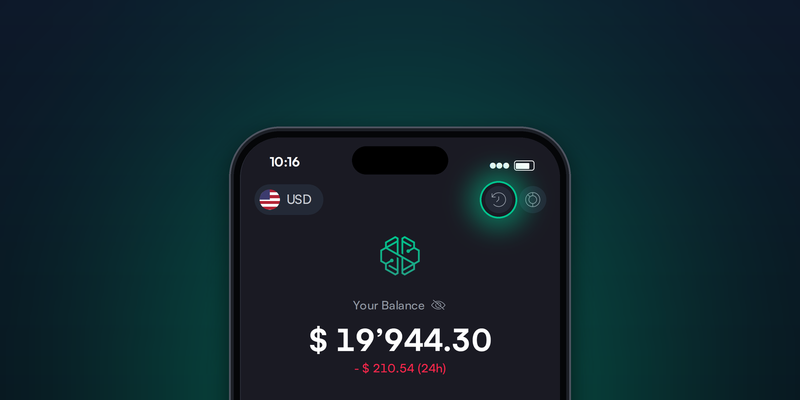
Many of you have told us the same thing, so we built the answer. Global Transaction History brings your full SwissBorg transaction history, across every asset, into one list, right from your Portfolio screen. It is live now on iOS and Android with app version 1.150.0.
Global Transaction History at a Glance
What it is: One list of your transactions across every asset in your SwissBorg account
Where: Portfolio screen, via the new history button next to portfolio insights
What it shows: Deposits, sends, card payments, exchanges, Auto-Invest, Bundles, Earn subscriptions, Trigger Orders, Cashback and rewards
Filters: Asset, type and a custom period, from any date to today
Available on: iOS and Android, from app version 1.150.0
How Global Transaction History Works

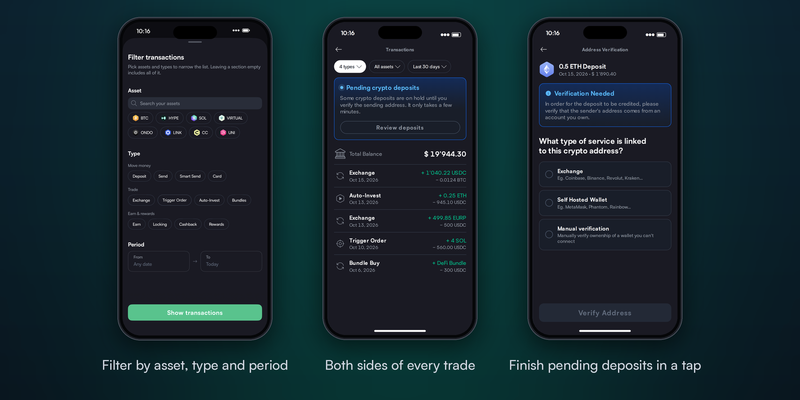
Tap the history button on your Portfolio screen and your full activity opens in one place: deposits, sends, Smart Send, Card payments, exchanges, Trigger Orders, Auto-Invest, Bundles, locking, Cashback and rewards.
Filter by what matters to you. Pick one or more assets, or search for one. Choose transaction types, grouped into Move money, Trade, and Earn & rewards. Then set a period with a From and To date. Leave a section empty and it includes everything.
See both sides of every trade. Exchanges, Trigger Orders, Auto-Invest and Bundles now show what you received and what you paid in the same row, so you never have to piece a trade back together.
Spot anything that needs you. If a deposit is waiting for address verification, it is flagged in the list. Tap it and you go straight to Address Verification to finish it.
Earn payouts stay in each Earn strategy's Active Balance Transactions section, where you already follow them. Global Transaction History shows your Earn subscriptions and redemptions.
Your Three-Step Plan: How to See Your Transaction History

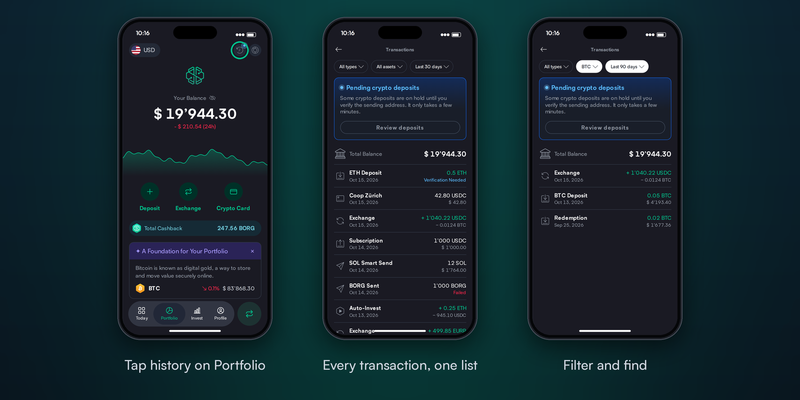
- Update your app. Make sure you are on version 1.150.0 or later on iOS or Android.
- Open your Portfolio. Tap the new history button next to portfolio insights.
- Filter and find. Narrow it down by asset, type or period, and tap any transaction for its details.
Find Anything in Seconds
Checking whether a deposit has landed takes a glance. Reviewing last month's trades takes a couple of taps. And when you want the full picture of what you have done with your money, it is all there, in one list, in the order it happened.
It builds on the clearer Bundle performance tracking we launched earlier, and works alongside Reporting for when you need the full numbers at tax time, alongside our partnership with Koinly.
Less scrolling. More clarity.
Thank you to everyone in our community who asked for this. Keep the ideas coming.
Update the SwissBorg app and open your Portfolio to try Global Transaction History today.
Global Transaction History: Frequently Asked Questions (FAQ)
Open your Portfolio screen and tap the history button next to portfolio insights. Global Transaction History shows your transactions across every asset in one list.
Transactions across all your assets, including deposits, sends, Smart Send, Card payments, exchanges, Trigger Orders, Auto-Invest, Bundles, locking, Cashback and rewards.
Yes. You can filter by asset, by transaction type and by period, choosing any From and To dates.
Yes. Exchanges, Trigger Orders, Auto-Invest and Bundles show what you received and what you paid in the same row.
Earn payouts stay in each Earn strategy's Active Balance Transactions section. Global Transaction History shows your Earn subscriptions and redemptions.
Yes. Global Transaction History is available on iOS and Android from app version 1.150.0.
Engineered in Switzerland. Licensed in Europe.
Growing Wealth Together.
Continue the conversation:
X | Instagram | YouTube | Discord | Telegram
This is a crypto-asset marketing communication. Crypto-assets are highly volatile, may not be suitable for retail investors and the entire amount invested may be lost. It is important to read and understand the risks of this investment, which are explained in the List of Risks page.
Date modified: