


Auto-Invest Price Conditions: Automate Your Crypto Entry and Exit




Dan Stokes
Community Growth
Building long-term wealth in crypto requires discipline, consistency, and automated execution. While Dollar Cost Averaging (DCA) into the market has long been the cornerstone of smart crypto investing, having a clear plan to exit and take profits is equally critical.
To give you complete control over your recurring buys and sells without sacrificing hands-off automation, we are introducing upgrades to SwissBorg Auto-Invest: Price Conditions and Custom Strategy Naming.
Found under Advanced Options on every Auto-Invest strategy, these features give you precision control over both your entry and exit strategies.
Even better, you do not have to start from scratch: you can edit your existing Auto-Invest plans right now to add a price condition and give them a personalised name.
What Is New in SwissBorg Auto-Invest?

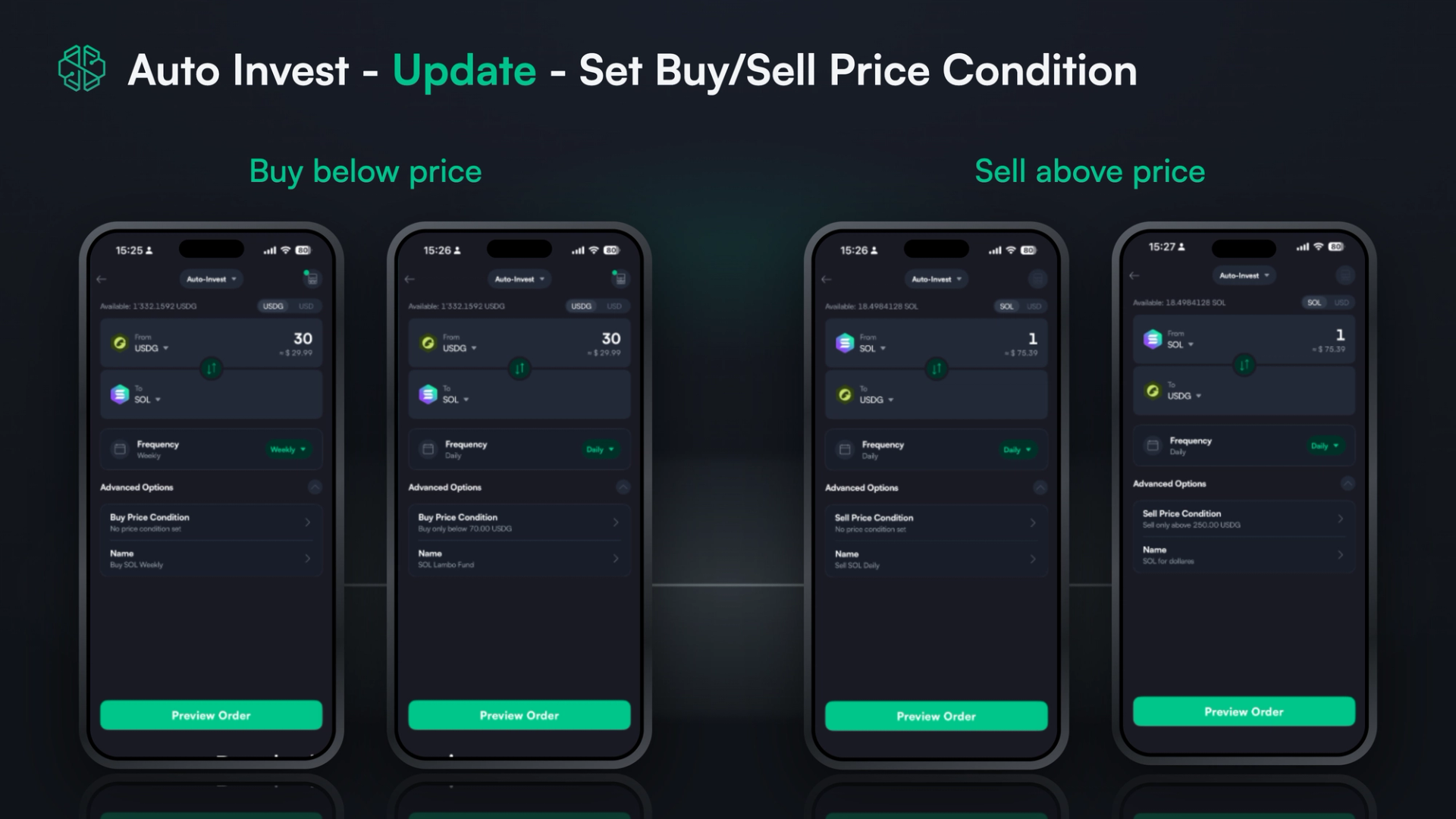
The latest Auto-Invest update adds two customisation tools that give you more flexibility over your recurring crypto buys and sells, across both fiat and crypto-to-crypto trading pairs.
How Price Conditions Work: Buy Below and Sell Above
You can now gate the execution of any recurring buy or sell strategy behind a specific price threshold:
- Buy Below Price (≤): Ensure your recurring buy order only executes when an asset is trading below your maximum desired price. If the asset moves above your limit, execution pauses automatically until the market dips back into your buying zone.
- Sell Above Price (≥): Ensure your recurring sell order only executes when an asset hits or exceeds your profit target, allowing you to systematically DCA out of your holdings.
Together, these conditions give you a level of control that no other crypto app offers, without asking you to monitor the market yourself.
Custom Strategy Names for Your Recurring Buys and Sells
You are no longer restricted to default system labels. You can now assign custom names to each strategy upon creation or by editing an existing one. Whether you want to label a strategy "SOL Lambo Fund", "Weekly BTC DCA", or "Profit Taking 2026", custom names make managing multiple recurring strategies effortless.
How to Set Up a Price Condition in the SwissBorg App
Setting up a price condition or custom name takes seconds within the SwissBorg app, and you can apply these settings to both new and existing plans:
- Open a New Auto-Invest or Edit an Existing Strategy: Choose the assets you want to exchange and set your frequency for a new plan, or simply tap 'Edit' on one of your currently active Auto-Invest strategies.
- Open Advanced Options: Tap the Advanced Options menu on the configuration screen.
- Customise Your Strategy: Set your Buy Price Condition (from fiat, stablecoin or crypto to crypto) or Sell Price Condition (from crypto to fiat or stablecoin), enter your threshold, and, if you want to, type your Custom Strategy Name.
- Preview & Confirm: Review your strategy parameters and tap to activate or save your changes.
How to Take Profit in Crypto Without Timing the Top


One of the hardest parts of crypto investing is knowing how to take profit. When the market surges, emotion and greed often take over, convincing investors to wait for just one more leg up. All too often, the market turns, and hard-earned gains disappear.
Trying to time the exact top of a bull market is virtually impossible, even for professionals. The most successful investors rely on a predefined strategy: Dollar Cost Averaging out.
With our new Sell Above Price condition, you can put your profit-taking plan on complete autopilot:
- Define Your Profit Zone: Set a target price condition (e.g., Sell only when price is above 250 USDG).
- Automate Execution: Your recurring strategy will remain idle until the market reaches or exceeds your chosen threshold.
- Remove Emotion: Once your price condition is met, your strategy regularly locks in gains according to your chosen schedule (daily, weekly, or monthly) without requiring you to manually monitor charts or guess the top.
By setting up your "Sell Above" plan in advance, you make rational decisions today rather than emotional ones tomorrow.
Plan Your Trade, Automate Your Discipline

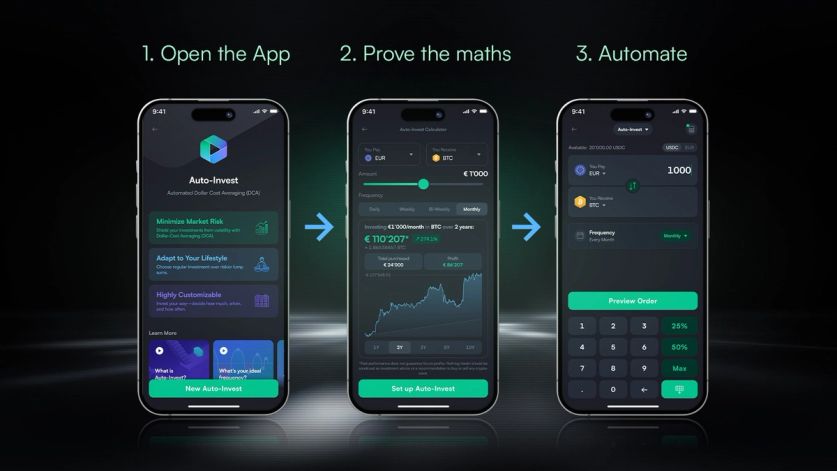
Whether you are accumulating your favourite digital assets during market dips or setting up a systematic exit strategy to harvest gains, the upgraded SwissBorg Auto-Invest puts you firmly in control.
And as your plans multiply, custom names keep everything legible at a glance, so you can see your accumulation strategies and your profit-taking strategies side by side and know exactly what each one is doing.
If you are not sure where to begin, you can use the in-app DCA Calculator to visualise potential outcomes and build your strategy. It allows you to model different scenarios based on historical market data, helping you test the perfect entry and exit plan before committing your funds.
Open the SwissBorg app to set up your custom Auto-Invest strategy today.
Automate your entry, secure your profits, and grow your wealth on your own terms.
Auto-Invest Price Conditions FAQ
Your strategy stays idle and no execution takes place. Once the market moves into your specified range, your scheduled buys or sells resume automatically at your chosen frequency.
Yes. Open any active Auto-Invest strategy, tap Edit, and add a price condition or custom name under Advanced Options.
Yes. Buy price conditions are available on fiat-quoted, stablecoin-to-crypto, and crypto-to-crypto pairs. Sell price conditions apply when exchanging crypto into fiat or a stablecoin.
Each Auto-Invest strategy is either a recurring buy or a recurring sell, so it carries one condition type. You can run separate strategies with a buy condition and a sell condition on the same asset.
That execution is simply skipped. For example, if you have a daily buy set to execute only below a certain price and the market moves above it, that day's buy does not take place. When your next scheduled execution comes around, the app checks the price again and executes only if your condition is met at that point. Skipped amounts are not queued or added to future executions.
Yes. Using a Sell Above Price condition, you can set a recurring sell that only executes once an asset reaches or exceeds your target price, letting you take profit on a schedule rather than trying to pick the top manually.
DCA out means selling a position gradually on a regular schedule rather than exiting all at once. It applies the same logic as Dollar Cost Averaging in reverse, spreading your exit across multiple executions to reduce the impact of any single price point.
Continue the conversation:
X | Instagram | YouTube | Discord | Telegram
Crypto assets are highly volatile. You risk losing all invested capital. This article is for informational purposes only and is not financial advice.You can learn more about risks associated with crypto assets at https://swissborg.com/legal/list-of-risks
Date modified: